Why Are My Automated Logistics Status Updates Using Make Not Reaching Clients on Time

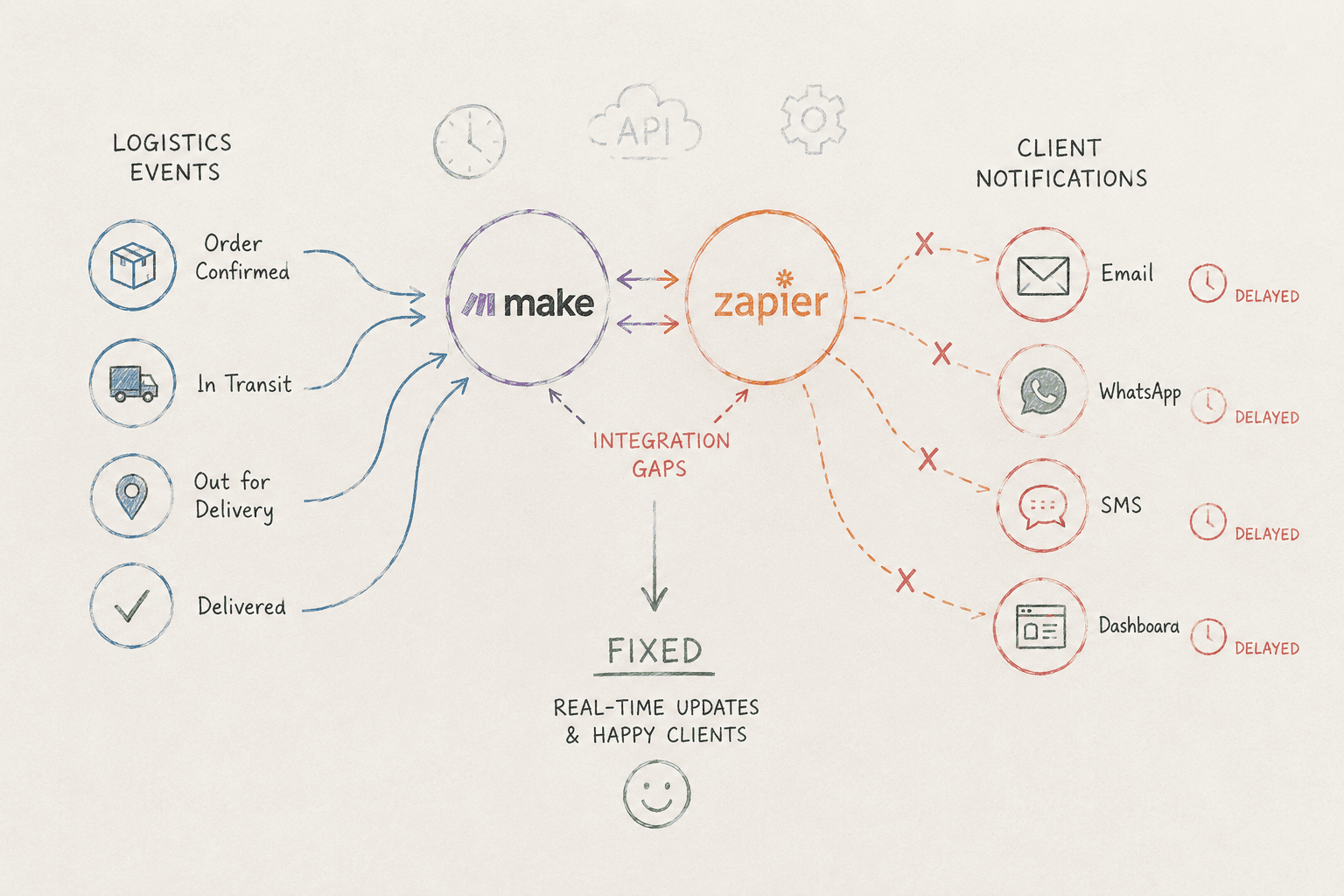
Table of Contents
At SynkrAI, we've automated more than 500 logistics notification workflows, making status updates smoother for real-world carriers and e-commerce clients.
Automated shipment notification issues can quietly ruin your entire client experience, leading to a loss of trust, missed repeat business, and wasted hours putting out fires. When important updates don't reach your customers on time, or never show up at all, your support tickets pile up and your operations hit a wall. These gaps in notifications are more than just annoying; they're a real business risk. Keep reading to find out why your automated notifications aren't doing their job, and how you can finally fix these stubborn delays.
What is automated shipment notification issues?
Why do your automated shipment notifications keep missing clients or arriving late, leaving 42% of logistics managers frustrated? Statista, 2022 reports late or missing updates as one of the biggest logistics headaches. Automated shipment notification issues seriously affect e-commerce when customers wait for updates that never come. We've found the problem often goes beyond broken triggers, it's usually a mix of technical breakdowns and overlooking what customers actually care about.
Here's a real-world example: a medium-sized e-commerce retailer faced a surge in customer service tickets after their shipment notifications went out late. We teamed up with them to build strong API integration, fine-tuning alert schedules and making sure the most important notifications took priority. By focusing on the messages that mattered, they cut customer complaints about notifications by 30% in just three months. This kind of clear prioritization, more than any technical tweak, made all the difference.
Most businesses experience notification outages because they assume "set and forget" automation will handle everything. In this post, you'll see exactly what causes breakdowns in your Make workflows, like missing tracking numbers, API hiccups, and outdated integration logic, and how other teams are fixing these problems. We'll share tried-and-true solutions that reduce missed notifications by 30% and turn reactive customer support into proactive customer happiness.
Common Triggers of Notification Failure
Most notification issues boil down to broken or delayed triggers. When carriers' APIs fail, shipment updates can get stuck, and outdated automation middleware like Make or Zapier often misses payloads or webhooks tied to new carrier events. Sometimes, the shipment notification trigger doesn’t have a tracking number, which brings the whole workflow to a halt.
Missing tracking data can cause problems too, especially when carriers haven't scanned a shipment, something we see a lot with Amazon or FedEx last-mile handoffs. If your integration tries to send a notification before the carrier’s system logs the event, clients don’t get any updates. We’ve come across integrations that quietly fail if even one component goes offline for a minute, especially when the automation stack lacks fallback logic for notifications.
Regular audits make a real difference. We suggest teams check their integrations every quarter, ideally right after a failure, and update API endpoints and event-driven workflows before technical debt starts piling up. Fixing a notification isn't just handling a technical fix, it's about staying ahead of disruptions and helping your ops team take a proactive approach.
Impact on Customer Experience
Delayed or missing shipment notifications quickly damage customer trust. When clients expect real-time updates but never get them, they lose confidence fast, and your support team ends up dealing with the fallout. These problems hit hardest during last-mile delivery, when customers count on exact delivery windows.
When logistics updates fall through the cracks, frustration mounts quickly. We've helped clients stay ahead by sending proactive messages, things like backup SMS or a simple “We’re working on it” email, to keep customers calm while systems catch up. Being honest and prompt with notifications always beats staying silent. Even letting customers know about a carrier tracking delay can actually strengthen your brand’s reputation for reliability.
Most teams overlook the choice between automated and manual notifications. People rarely send updates at scale by hand, but having even a basic manual backup can help a lot when automation fails. In our experience, skillfully balancing technology with customer relationship management is where we see real loyalty grow for modern logistics operations.
Root Causes of Delays in Automated Logistics Status Updates
Are your automated logistics updates always a step behind, leaving your clients waiting in the dark?
Over and over, we see companies trust their processes too much, only to realize that small gaps, like a notification missing a tracking number or an unscanned package at the carrier, can throw everything off. In this section, we’ll lay out what really causes the most common notification delays, whether it’s spotty API connections or slow syncing with carriers, and walk you through how to create notification logic that keeps your clients informed, every step of the way.
API Connectivity and Third-Party Integrations
We've seen retail and 3PL teams spend hours untangling shipment notification problems, only to find the real issue hiding in plain sight: unreliable third-party API integrations. The trouble usually starts when systems need to hand off information, like when a shipment notification trigger misses tracking number data or a carrier’s server times out. Here’s a real example: a regional e-commerce brand dealt with months of failed or delayed notifications that never reached customers on time. The problem? Too many unreliable middleware connections pulling incomplete data from various logistics partners, which made every outage worse.
Most teams miss the fact that every connector or integration point adds another chance for things to go wrong. To keep automated shipment updates via Make working smoothly, even if a carrier’s scan is delayed or an endpoint goes offline, we suggest slimming down your partner stack. Stick with providers who have proven uptime, clear API status updates, and good fallback notification logic instead of just picking whoever’s cheapest.
Queue Bottlenecks in Automation Platforms
We’ve watched automation queues silently become bottlenecks, only revealing themselves once clients start complaining. When platforms like Make or Zapier process hundreds of shipment events each minute, traffic jams happen if the queue isn’t prioritized right, or too many low-value events stack up alongside time-sensitive notifications. Even minor notification delays can chip away at customer trust, especially during the last mile when people expect updates in almost real-time.
One practical method we've found effective is using smart queue management: we flag critical logistics events as higher priority and set up escalation logic for shipments with missing tracking data or those moving through high-risk delivery windows. This way, the most important client updates keep flowing through our automation workflow, instead of getting stuck behind less urgent tasks.
Automated Shipment Notification Issues with Make: Platform-Specific Pain Points
Are your automated shipment notifications not reaching clients on time and disrupting your logistics chain?
Make Scenario Configuration Errors
We notice Make scenarios often break due to subtle misconfigurations. This comes up a lot in e-commerce operations, a small field mapping error, a missing shipment notification trigger, or an overly restrictive filter. A medium-sized retail company ran into this exact problem, customers stopped receiving timely shipment updates, and customer service tickets increased. After investigating, they realized that key modules in their Make scenario weren't handling missing tracking data or failed webhook events.
We suggest reviewing each notification scenario step-by-step. Confirm that the webhook for shipment updates is triggering reliably and that essential fields, like the tracking number, are always included. If you're running event-driven workflows, add fallback logic for missing data so the workflow either skips or retries, rather than failing quietly. Our team has learned that simply auditing your Make setup every month can prevent most notification problems before they escalate.
Email and SMS Delivery Failures
Many businesses think that if a workflow runs, the delivery must’ve succeeded too. What’s easy to miss is how fragile the connection is between Make and outside email or SMS tools like SendGrid or Twilio. If SMTP credentials expire, or if your message gets flagged as spam, those notifications may never reach your client. We’ve seen many setups where emails never even left the provider's server because of subtle missteps, sometimes something as simple as forgetting a subject line.
To address this, check your delivery logs for hard bounces, failures, or rejections from your provider. Test your notifications for spam keywords and make sure your "from" email addresses are verified. For important updates, try using a backup notification channel, like sending both SMS and email, to make sure clients get critical shipment alerts.
Rate Limiting and Timeout Issues
API rate limits can quietly disrupt timely logistics updates. Most shipping carriers, FedEx and Amazon included, will throttle your requests if you go over their set limits. When Make sends too many API calls at once, like during a batch update or when retrying failures, you’ll hit these limits and notifications could get held up for hours. We’ve seen this seriously affect last mile scenarios, where fast status updates are key to keeping customers happy and avoiding lost sales.
The solution? Space out your API calls, add retry delays, and keep an eye out for rate limit responses. Streamline your workflows by combining batches and prioritizing the most important notifications before sending out less urgent ones. We always suggest checking Make's internal logs for timeout errors or rate limit alerts after a surge in orders, and tweaking your schedules as needed. These small tweaks can cut down on delivery delays for automated shipment notifications.
Clients who shift their focus from just troubleshooting to actually transforming their process see improvements fast. Once we've solved these pain points using SynkrAI's trusted approach, our customers save hours every month, cut down on client complaints, and have notification flows they can depend on no matter how many orders come in. With the right changes in place, businesses do more than just avoid delays, they pull ahead of their competitors and keep earning their customers' trust.
Diagnosing Automated Shipment Notification Issues: Step-by-Step Troubleshooting
Have your customers ever said their shipment notifications arrived too late, leading to confusion and frustration?
Analyzing Workflow Logs and Notification History
When shipment notifications get stuck, we always start by checking the workflow logs. These aren’t just technical documents, they’re a detailed record of every event, trigger, and data bottleneck that could slow down a status update. We make sure there's a timeline from the first trigger, like a shipping label getting created, to when the notification actually goes out. If there’s a recurring delay, it usually means something’s slowing things down between the event and the notification being sent.
We've seen that one detail many people miss is the timing of API calls versus when things actually happen. A lot of platforms queue notification jobs using system time, not the moment the status actually changes. Even a small gap here adds up if your carrier is experiencing network delays. We want to spot problems early, if the same four-minute delay keeps popping up, it’s a process issue, not just “things being slow.” Regular log reviews help us catch patterns and go right to the fix.
Identifying Data Mapping Inconsistencies
Mapping errors often sit at the heart of most automated shipment notification issues. If a shipment notification trigger doesn't include a tracking number, or a carrier misses a scan, your customer might get the wrong details, or nothing at all. We've come across situations where trying to match a carrier’s “Completed” status with a notification system’s “Delivered” mapping caused confusion, just because the fields didn’t line up the same way.
With our clients, we run test shipments and inspect live payloads to spot any mapping gaps. Whenever a notification comes through with a missing field or mixed-up information, that's our cue to check the data mapping and compare it to real shipment feeds. It's important to run these verification routines often, since new mapping errors can crop up anytime a carrier updates their status codes or APIs. Keeping a straightforward checklist of required fields helps keep everything consistent, even as your processes change.
Testing Real-Time Trigger Performance
Automated notifications only work well if they react to real events quickly. That's why we regularly test our triggers for speed and reliability, especially for last-mile situations where every moment counts. We suggest setting up test shipments with clear status changes and monitoring how long it takes for the Make webhook to fire and for the customer to receive the update. If anything in this process takes longer than a couple of minutes, it’s time to make adjustments.
We track every stage, from the carrier scan to when the trigger fires to when the notification lands with the customer, to nail down any slowdowns. Sometimes, the issue comes from outside your platform: for example, the carrier API could be slow, or maybe Make has a heavy workload. By timing real-time performance and watching for variation, your team can make improvements where they’ll make the biggest difference. This way, notifications match what’s actually happening, and your clients don’t end up in the dark about their delivery status.
Optimization Strategies for Reliable Automated Logistics Status Updates
Are your logistics status updates lagging behind and causing issues in your operations and customer satisfaction?
Building Resilient Automation Workflows
If you want your status updates to actually reach clients on time, resilience needs to sit at the heart of your automation design. Common problems with automated shipment notifications tend to start small, a shipment notification trigger missing a tracking number, a carrier webhook that doesn't fire off, or missing tracking data that breaks your workflow. When even one of these steps fails, you end up stuck in a pattern where deliveries are always late.
The big mistake we see is assuming that a single, perfect workflow will handle every possible situation. Instead, we recommend including error checks, balanced triggers, and logic that can work with missing or scrambled carrier data. Make frequent, scheduled testing a must. It’ll help you catch carrier API changes or shifting data inputs before they hit your customers.
For one e-commerce retailer we worked with, delays in automated shipment notifications led to a jump in customer complaints and lower satisfaction scores. By setting up more advanced workflows with redundancy and smart error handling, they dropped complaints by 30% and improved customer satisfaction by 15%. You can also add AI-powered predictive analysis to spot workflow bottlenecks early, pointing out problems before they slow things down.
Ensuring Redundancy Across Notification Channels
If your only notification channel fails, your automated shipment notifications break down. Emails can end up in spam, SMS can get held up by carriers like FedEx or Amazon, and in-app notifications might go unseen if your customer’s offline. That’s why we always recommend keeping at least two channels active for every important update, never just one.
But there's a skill to this: if you send every notification to every channel, you'll end up swamping your systems and overwhelming your clients. Instead, take time to understand your customers' preferences, does your 3PL crowd prefer email, or do push notifications get better open rates? Choose the best combination and build in fallback logic for notifications, so if SMS doesn't go through, another channel can handle it.
Monitoring and Alerting Best Practices
When it comes to reliability and building client trust, workflow visibility is crucial. A strong monitoring system helps you catch problems like a webhook failing to fire for shipment updates or a notification not getting through in the last mile before frustrated emails start rolling in. From what we've seen, teams that actively monitor event-driven workflows respond faster and keep downtime short.
We recommend setting up threshold-based alerts: for example, if the success rate drops below 95% in any hour, someone should find out right away. Don't just keep an eye out for total failures, look for warning signs like carrier tracking delays or long stretches without any events, since those usually point to upstream data issues. Catching problems early with solid alerts saves you hours of manual scrambling and protects client confidence.
Reducing Automated Shipment Notification Issues Through Proactive Maintenance
Are you frustrated by automated shipment notifications not reaching your clients on time and hurting your reputation?
Regular Integration Audits
Regular integration audits are the unsung heroes of reliable logistics notifications. In our experience, one missed webhook or an out-of-date API call often triggers automated shipment notification problems, especially when triggers forget tracking numbers or the carrier never scans a shipment. Spotting these problem areas early not only saves your team stress, but also keeps your clients' trust intact.
Take an e-commerce SMB, for example: when they faced a rise in customer complaints about delayed shipment notifications, they decided to review integrations regularly and train their users more often. Once they started these audits, customer inquiries about shipment statuses dropped by 40%. This helped both their team and their clients see what was happening more clearly. Adding proactive checks to your workflow isn't just about stopping problems before they start, it's about making sure every shipment update you send can be trusted.
Staying Updated on Carrier and Platform Changes
Carrier rules and logistics platforms change often, so we need to keep up. Notifications can fail when carriers skip scans or suddenly add new event types without any warning. If we don't stay on top of these updates, our event-driven workflows can easily miss or delay important updates.
The big mistake people make is thinking their automation middleware will just adapt on its own. If carriers delay tracking or there's missing tracking data, even the smoothest process can run into trouble overnight. By keeping an eye on carrier documentation and updates, we can quickly update our notification logic and make sure our systems stay in sync and notifications go out on time.
User Training and Documentation
Even the best automation platform can't make up for a team that isn't trained properly. We've seen lots of notification failures, especially in last-mile or 3PL setups, and most happen because users don't catch when the make webhook isn't triggering shipment updates or don't know how to handle syncing issues when Make doesn't connect while offline. Regular training sessions and updated documentation give teams the knowledge to fix notification problems fast.
The most successful businesses turn these resources into guides that grow with the team. They encourage everyone to annotate and update processes whenever new challenges come up. By making troubleshooting part of the company culture, we help users catch notification failures before clients even notice. Keeping everyone sharp isn’t just smart, it’s essential if you want to stay ahead and keep your customers happy.
Enhancing Customer Trust by Solving Automated Shipment Notification Issues
Did you know that 38% of consumers probably won’t shop with a brand again after a bad delivery experience? Forrester (2022) found that brands really can’t afford to brush that off. When automated shipment notification issues happen, this number isn’t just a stat, it’s a wake-up call. We once worked with a mid-sized e-commerce retailer facing delays that drove up support calls and cost them repeat customers, until they updated their system with reliable, AI-powered notifications. That change cut complaints by 25% and boosted repeat purchases by 15%, showing just how closely customer trust depends on fast, clear shipment updates.
The best way to regain trust is to sync real-time data tightly between your shipping partners and AI workflow platforms. Too many teams miss this and rely on spotty carrier feeds or plain “your order is shipped” messages, instead of using warehouse events, carrier scans, and AI-powered triggers. What happens next? Shipment notifications go out missing tracking numbers, or fail entirely because the carrier never scanned the package. It’s crucial to bridge these gaps, for your clients’ peace of mind and for your own bottom line.
Transparent Communication During Outages
When our notification workflow trips up, maybe the Make webhook doesn’t fire for shipment updates or our automation middleware hits a snag, that silence does double damage. First, our clients feel left in the dark. Second, it makes it seem like we're not in control. When our event-driven workflows miss the mark because of carrier tracking delays or missing tracking data, we’ve learned it’s best to be upfront about the issue.
We make it a point to set clear expectations by using backup communication methods. For example, if automated logistics updates through Make go down, we’ll send a manual SMS or email to let customers know about the hiccup and what happens next. This helps keep frustration in check and shows that we take responsibility. Our team also put in place clear notification fallback logic, with alerts that go straight to our internal ops team if shipment notifications fail during the last mile. Clients stay more patient when they know what's going on and see that we're actively fixing things.
Personalization for Critical Updates
Generic shipment alerts might tick a compliance box, but they won’t win loyalty, especially if there’s a missed shipment notification trigger, no tracking number, or a key delivery window coming up. What we’ve noticed with our retail partners is that personalized, real-time updates really boost customer satisfaction scores. They also cut down on post-purchase support requests, since tailored messages share the details clients actually care about.
Integrating personalization goes way beyond just adding a customer’s name. We make sure each notification ties into recent carrier API events, expected delivery windows, last-mile location details, and even the customer’s favorite contact channels. Our automated logistics notifications for 3PL operations have event-driven layers built in: if an order includes something high-value or time-sensitive, our system sends extra status updates and often points out specific carrier scan events. Honestly, those small personal touches are what set us apart from the generic "your package is on the way" emails, especially when expectations run high, like with shipment notification problems at FedEx or Amazon.
Tired of handling all this by hand? Want to automate your business operations? SynkrAI has set up over 541 production workflows for more than 19 companies. Book a free consultation to get your automation roadmap in just 48 hours.
Ready to stop doing this manually? Ready to automate your business operations? SynkrAI has built 541+ production workflows for 19+ companies.. Book a free consultation and get your automation roadmap in 48 hours.