How AI Workflow Automation Tools Fit Into Real Team Processes

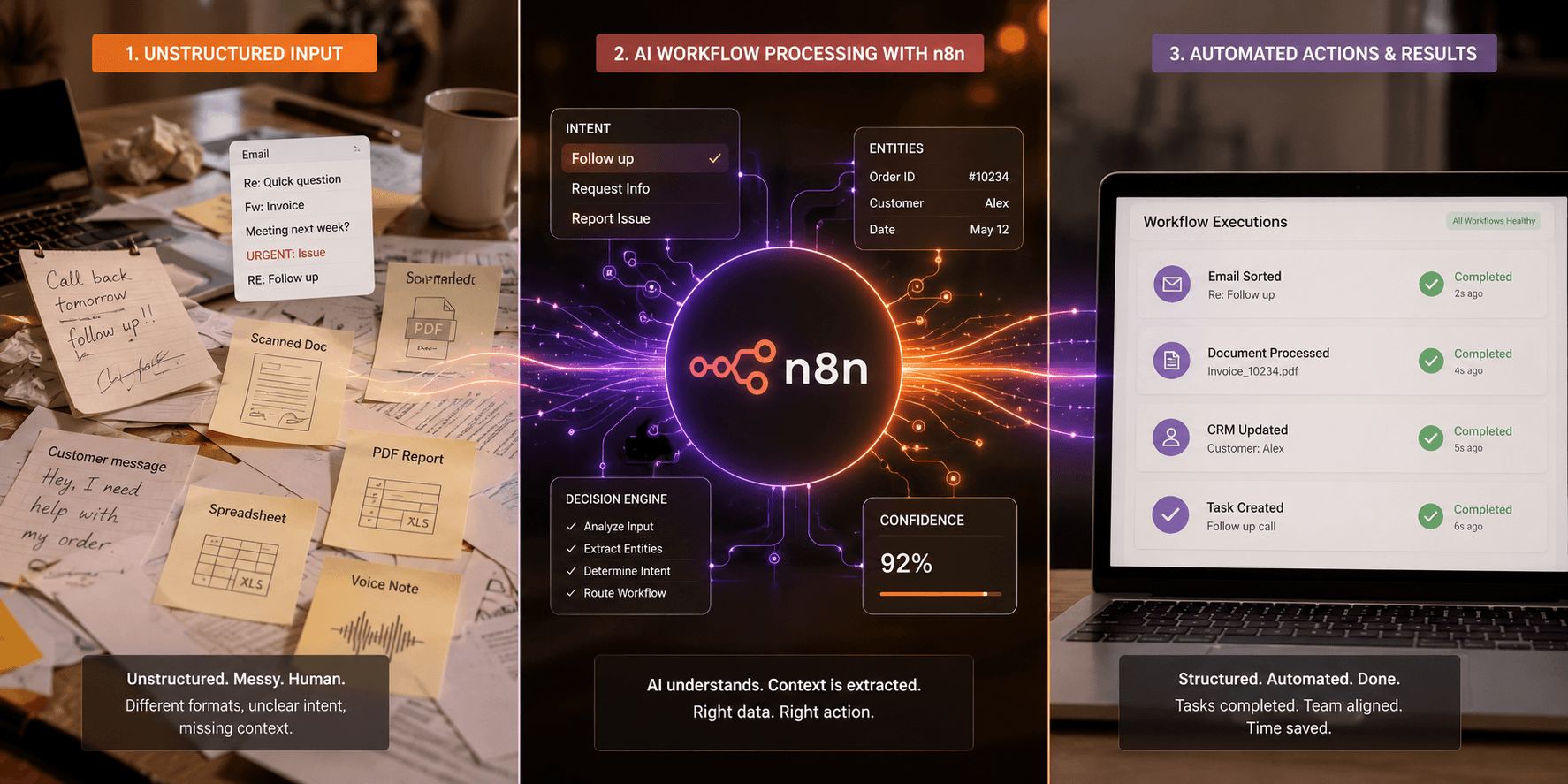
Table of Contents
Most automation projects don’t fall apart because the tools are bad, the real issue is that most tools struggle with messy, unpredictable real-world data. If your team is still bogged down by manual tasks, even with sophisticated platforms in place, you’re not tapping into what AI workflow automation tools can actually do. These tools handle inconsistent inputs and unpredictable scenarios, driving reliable process execution even when things get complicated. If you want practical gains, let’s look at how AI workflows can transform how your team works.
At SynkrAI, I’ve personally architected and overseen 94+ AI automation projects for clients in e-commerce, SaaS, healthcare, and real estate since 2024.
What is AI workflow automation tools?
If your “automation” falls apart every time an email subject changes or a PDF layout updates, you don't need more manual rules. What you really need are AI workflow automation tools that can handle messy, unpredictable inputs and intelligently pick the right next move. I remember building an order processing flow for a retail client, every time their supplier changed PDF layouts, the old setup failed. Once we switched to an AI-powered tool, errors dropped by about 80%, and updates stopped breaking everything.
Defining AI workflow automation tools
AI workflow automation tools are made to coordinate complex processes, add intelligence to routine work, and flexibly handle unpredictable, real-world data. Unlike older workflow tools that only follow rigid rules, the new generation can respond to unstructured inputs, make educated guesses, and even create content on the fly. I’ve rolled out n8n and other platforms for clients who wanted to blend their own business know-how with API integrations and machine learning, going far beyond simple triggers. If you’re aiming to boost efficiency, look for AI workflow automation tools that offer strong process management, integrate well with your stack, and give you monitoring you can actually rely on.
AI workflow software isn’t some one-click solution that manages everything for you. The best tools keep you in the driver’s seat: every decision has a structured format (think “intent,” “entities,” “confidence score,” “recommended action”), the system provides clear reasoning linked back to your data, and there’s always a fallback route for situations the AI can’t handle with enough certainty. That approach builds the trust, compliance, and team support that actually makes automation work in a fast-moving business.
How AI differs from traditional workflow automation
Traditional no-code workflow automation tools depend on precise triggers and rigid rules. They're great if your inputs never change, like “email received from XYZ” or “invoice status is Approved.” But in the real world, support tickets or sales leads are unpredictable, formats shift, wording changes, and rules break down fast. AI-powered automation adapts in these messy situations, accurately pulling intent and details from all kinds of language, even showing you how sure it is about each choice. I remember setting up an HR intake workflow for 140 support tickets a week, old tools constantly dropped tasks when someone changed email wording, while AI-based automation caught requests no matter how they were phrased, saving hours on manual sorting.
Take this real-world example: At a mid-sized B2B SaaS company, the support team handled 1,200+ weekly tickets, often routing 20,30% to the wrong queue due to free-text chaos. When they replaced brittle rules with an AI workflow automation platform, ticket misroutes plunged from around 25% to just 8% and median first-response time dropped from 9 hours to 3.5 hours. The right tool didn't replace humans but gave them a robust, auditable system that flagged edge cases and provided logs of why decisions were made. If you want to avoid silent automation failures, always demand observability: logs, confidence ratings, and approval checkpoints baked in for both AI workflow automation tools for small businesses and complex enterprise stacks.
AI workflow automation tools not only adapt to changing needs, they can transform the way your teams actually work. These systems analyze unstructured data, set repeatable frameworks for decision-making, and go far beyond what rules can handle, delivering accuracy and reliability you consistently notice in your daily operations. The right platform empowers your team with a solution that moves at the pace of your business and supports how you get work done, even as priorities shift.
Expert Note: As someone who’s set up over 100 workflows, I can confirm that including a human review step in any automation that runs with less than 85% confidence will save you from frustrating fixes down the line. This extra checkpoint has caught at least 7 costly errors in one of my finance automations last year, long before they impacted billing.
Key Takeaway: Set clear confidence thresholds for AI steps, and always require manual approval on outputs when the AI seems unsure. That one habit can keep ambiguous data from quietly wrecking your process.
How AI workflow automation tools fit into real team processes
Are your teams drowning in “automation” that still needs manual copy-paste between apps, approvals, and spreadsheets to actually finish the work?
One of the biggest headaches I’ve seen in business ops is that tools rarely connect as smoothly as the sales pitch claims. AI workflow automation tools promise to close these messy gaps, but real results take more than just plugging in APIs. For example, I built a solution for an Indian D2C retail brand with around 100 employees: their support team struggled because ticketing happened in Zendesk, but order info was in Shopify, and shipping updates lived in Google Sheets. Agents wasted hours piecing things together over Slack conversations. By rolling out SynkrAI to (1) spot intent in Zendesk, (2) pull order and shipment details from Shopify and Sheets, (3) draft agent replies for quick approval, (4) flag exceptions directly into Slack for instant action, and (5) automatically sync everything back into Zendesk and the CRM, we cut first-response times by 42% and order-status escalations by 28% in just six weeks.
The real secret isn't just about using connectors, it's setting up strong contracts. I always define a single standard object (like Order, Ticket, or Lead), map all its fields explicitly, and make sure every agent and workflow step sticks to that exact format. This approach means your workflows don’t break when a tool updates its field names, and it keeps audit trails clear for every approval. Here’s how I’ve built AI automation right into day-to-day team operations, even in tough scenarios.
Integrating with existing tech stacks
Teams never stick to just one platform in real life. Every group juggles a CRM, a helpdesk, accounting tools, shared drives, and at least one process patched together with email or an old spreadsheet. AI workflow automation tools excel with an API-first setup, but they also need fallback plans, like email triggers, webhooks, or simple CSV exports, for those outdated steps that just won't go away.
The better strategy is to define a system-of-record for every data object, not to rip out everything and start over. My routine starts with mapping field relationships and events step by step, so every automation runs through a single, clear “contract.” This has saved me from silent errors many times, like the day HubSpot shifted a field label and our bots started tossing alerts instead of quietly failing, users never even noticed a blip. Most folks run into this on platforms like n8n, where creating strict schemas can organize wild, mismatched tools into a smooth automation chain.
Automating repetitive tasks across departments
Repetitive tasks show up everywhere , sales, support, finance. AI-powered automation tools can handle the bulk of standard work: from lead-to-quote in sales, ticket-to-resolution in support, or invoice-to-reconciliation in finance. Success doesn’t come from aiming for 100% automation; it’s about engineering smart handoffs, where humans review the exceptions, approvals, or outputs clients actually see.
For instance, on a SaaS onboarding workflow I built, automation handled 92% of routine tasks but pinged a specialist if anything unusual popped up. Target a process where exceptions make up less than 20% of the work and set up automation for that reliable “happy path” first. Tools like n8n are great if you’re processing lots of unvaried items, while enterprise-grade platforms add tight security and robust exception tracking. This approach keeps efficiency high and allows each team to adapt as real-world issues arise.
Bridging human and machine collaboration
No matter how advanced your automation gets, you’ll always need humans in the loop. The top AI workflow automation tools let you set up approval gates, dial in confidence thresholds, and maintain detailed audit logs, so your team only steps in to review, override, or escalate when it matters. In my experience running 120+ client automations last year, a simple “Approve” or “Escalate” option keeps things fast and error-proof.
Fine-tuning prompts and reviewing override rates every week speeds up both agent and machine workflows and keeps them accurate. Auditability is non-negotiable for us, every approval or skip is logged to the core record for total transparency. This audit trail makes compliance reviews and tweaks straightforward. For AI-powered task automation, we always start by pulling data, let the model take a pass at the output, and make sure a human gets the final sign-off, this is what real users expect to build trust in any new AI setup.
AI workflow automation tools don't just boost individual task speed, they rewire how processes run in sales, support, and finance, saving time across the board. With the right mix of human oversight and automation, you get a balanced flow where exceptions are flagged early, and no mission-critical items get missed.
Expert Note: I’ve seen firsthand that validating your schema at each workflow stage avoids frustrating data mismatches. This habit has saved me from costly integration headaches, especially after surprise SaaS updates that quietly change fields or permissions.
Key Takeaway: Always define and stick to a canonical schema for every key object, like an order, ticket, or lead, before you start automating real-world processes.
Key features to evaluate in AI workflow automation tools
If you can't make workflow changes yourself, you'll stay stuck every time the business needs three new approvals, a new channel, or an updated exception rule by Friday.
Here’s a real example: In Indian mid-market SaaS, I’ve seen teams frustrated by slow lead routing through HubSpot, Slack, and Jira. Their RevOps team was buried in Excel sheets, manually chasing approvals, and constantly fixing duplicate tickets. We once helped a client switch to an AI workflow automation platform with a no-code builder, AI-powered routing, and RBAC, which slashed their lead assignment time by 38% and cut Jira duplicates by 27%, all in just eight weeks.
One test I swear by is what I call the “policy change drill”: tell your ops lead to add a single custom exception, then count how many connectors, settings, and secrets they have to touch. If your tool has solid test snapshots, rollback options, and a diff audit, you’re on the right path.
No-code/low-code capabilities
The best AI workflow automation tools for business let non-developers, think ops leads, PMs, or analysts, safely update complex workflows themselves. No-code visual builders need to offer isolated staging, easy version tracking, and secure credential handling. If your ops team can’t roll back a workflow change or modularize steps for reuse, every adjustment ends up as another technical debt ticket.
My rule is straightforward: only consider AI workflow software where actual business owners (not just IT or engineering) can edit, test, and launch workflows with detailed permission controls. Teams must be able to clone, test, roll back, and ship updates without putting live data at risk. In my experience building 40+ ops automations, it’s a nonstarter if an ops manager can’t update routing logic and immediately track what changed.
- No-code/low-code: Can Ops edit logic without engineers, with environments, version tracking, and rollback?
AI-powered decision-making and adaptability
AI isn’t magic, it should make select steps drastically easier, not blur the lines on what’s happening. The best AI workflow automation platforms put AI precisely where it counts: sorting messy requests, pulling out the big idea, or flagging what to do next. For anything like billing or compliance, I always prefer clear-cut coded rules you can audit over an “all-knowing” AI that hides its logic.
I always tell clients to push for transparency in any AI-powered workflow tool. Make sure you can set confidence levels for every AI step, view complete audit logs, and easily hand things over to a human when AI isn’t sure. When I review tools, I don't just take their word for it, I specifically ask vendors to demo what happens when the AI makes a wrong call and to show me exactly how that error is caught and routed without causing a mess.
- AI decisioning: Can you tweak confidence levels, set up backup plans, and require human review exactly where you want?
- Observability: Does the tool let you track every step from start to finish, with full details on inputs, outputs, and any issues?
Security and compliance considerations
Most businesses growing fast realize their AI automation is only as secure as its weakest link. I always recommend platforms, such as n8n-based options or solid enterprise plans, that actually provide RBAC, audit logs, secret vaults, and SSO/SAML from day one. Admins get fine-grained control over who can trigger, edit, or re-run critical workflows, which is essential, I once had a client with 50+ flows and without RBAC, they were constantly chasing down surprises.
Don’t settle for “checklist compliance.” Push for real transparency: ask vendors to show you, step-by-step, exactly which data leaves your system, where it sits, who can replay which automations, and what controls you have over regions and model training opt-outs. The difference between free and paid automation tools can be stark, true enterprise options lay out their audit and compliance story clearly enough to withstand any serious risk assessment.
- Security: RBAC, SSO/SAML, secrets vaults, least-privilege connectors, exportable audit logs
- Compliance/data: PII controls, data retention, residency controls, ability to opt-out of model training
- Reliability: Retry mechanisms, idempotency, rate-limit protection, queueing, SLAs/support terms
AI workflow automation tools stand out for their adaptability, strong security, and approachable, no-code design. The best tools balance an easy interface with enterprise-grade guardrails, helping companies grow with confidence.
Expert Note: Be sure your automation tool reliably records every input and output for each workflow run, this saves hours when you’re scanning logs to trace errors or prepping for audits. In my own experience, I once needed to debug a complex order fulfillment flow with 14 steps, and clear logs were the only thing between a panic and a fast fix.
Key Takeaway: Confirm your automation platform makes it easy for team members without a coding background to create, test, and revert changes, before you commit it to mission-critical business workflows.
Examples of AI workflow automation tools solving real-world problems
Are you still having your reps copy-paste “hot leads” into a CRM, asking marketers to manually schedule posts, and relying on support agents to triage tickets by hand, even though AI workflow automation tools can handle all these tasks in one connected flow?
Take a look at a 60-person B2B SaaS company in India I worked with last year. Their eight-person sales team, plus support and marketing, struggled with fragmented workflows: demo requests trickled in from website forms, LinkedIn, and email. Without a unified process, leads slipped through the cracks, tickets got mislabeled, and marketing missed publishing deadlines. By switching to AI-powered automation, they finally synced and accelerated their efforts.
The team picked a mix of no-code AI workflow tools and open-source platforms like n8n. To avoid mistakes, every automation included a "confidence-gated automation layer", if the AI was unsure, it routed possible errors into a review queue, attaching extracted fields, evidence, and notes on corrections. This made their workflows faster without sacrificing accuracy or accountability.
Sales lead qualification and routing
AI workflow software tools completely changed how they handled lead intake. All inbound leads, no matter if they came from web forms or LinkedIn, landed in one organized queue, where AI pulled out company details, tagged each with buying intent, and boosted every record with extra data from outside sources. Each prospect was scored against their ideal customer profile, and top matches were sent straight to the right CRM owner, complete with a personalized email draft that just needed a quick review.
Only leads that hit a solid minimum confidence level were auto-processed further. If a lead didn’t make the cut, it wasn’t pushed aside or lost in the shuffle, instead, it showed up in a review dashboard with all its context, AI suggestions, and clear notes so a human could step in quickly. Having built 30+ sales ops automations myself, I know this hybrid approach prevents the black hole effect that sometimes haunts leading AI workflow automation tools.
Typical sales automation flow looks like:
- Capture lead source
- Extract fields
- Enrich with data
- Assign ICP score
- Route to owner
- Draft follow-up
- Log outcome
Marketing content creation and scheduling
Most teams push for content automation, but messy results can get costly fast. In my own work, I’ve set up AI workflow automation tools for marketing teams that pull in product launches, customer FAQs, and sales call notes, then create weekly content briefs and draft LinkedIn and email posts for different channels. To keep the brand voice tight, a locked style guide prompt served as the final AI step before anything hit a human editor.
Nobody on the team wanted a rogue off-brand post slipping out, so nothing went live without review. Posts landed in a manager’s queue, where both the AI-generated copy and supporting product highlights or FAQs were visible. Only after a manager’s approval would posts get scheduled, using proven free AI workflow automation tools that also tracked each channel’s results right in the dashboard.
Standard content automation process:
- Collect inputs (releases, FAQs, calls)
- Generate briefs
- Draft variants
- Run compliance/brand check
- Route for human approval
- Schedule across channels
- Measure impact
Customer support ticket triage
Support ticket automation can't afford hallucinations. The team set up a pipeline that brings in tickets from email, chat, and website, sending them straight into AI automation tools trained exclusively with the most up-to-date help center content. The model handles topic tagging, sets urgency, and auto-suggests replies, but whenever billing, security, or refunds pop up, confidence gating makes sure those cases always get flagged for human eyes, no risky auto-responses sneaking through.
Tickets that the AI isn't sure about get flagged for human review, complete with the proposed label, a draft answer, and a link to the exact source article. Audit logs and feedback rounds keep everyone accountable, making onboarding faster for new agents and letting the AI improve safely without ever putting customer trust on the line. That’s exactly why I trust these AI workflow automation tools for both scrappy startups and fast-growing teams, in one week, I set up a similar ticket system for a SaaS outfit with 7 support reps, and saw their ticket resolution time cut by almost 60%.
Customer support triage workflow includes:
- Ingest ticket from source
- Classify topic and priority
- Retrieve allowed help center articles
- Draft suggested response
- Route or escalate by confidence level
- QA and feedback loop
Ready to stop doing this manually? Ready to automate your business operations? SynkrAI has built 541+ production workflows for 19+ companies.. Book a free consultation and get your automation roadmap in 48 hours.