SynkrAI Admin Panel
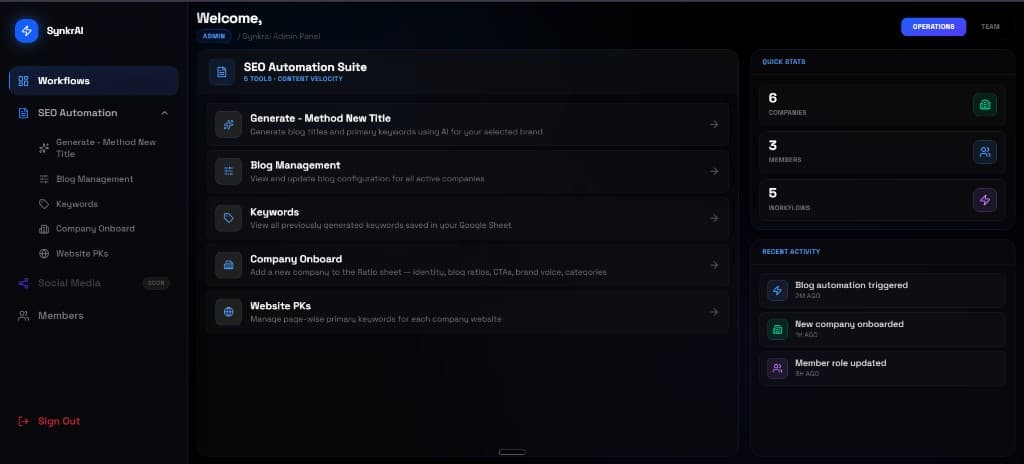
Our own internal hub at os.synkrai.com/admin. One place for the team to run blog automations, manage SEO tools, and track what shipped across every client company.
os.synkrai.com/admin


Our own internal hub at os.synkrai.com/admin. One place for the team to run blog automations, manage SEO tools, and track what shipped across every client company.
os.synkrai.com/admin
SEO automation worked. The problem was operations. Workflows were powerful but hard to hand off. Client context was spread across sheets and n8n instances. The team spent time coordinating instead of shipping content.
with no single front door for the internal team.
Manual n8n runs from saved workflow URLs
No shared view of which company was configured
Blog and SEO tools scattered across folders
Activity only visible inside n8n execution logs
SEO jobs lived in separate n8n links, sheets, and manual runs. No single place to see what was live for each client.
Only the person who built the workflow knew how to run it. New team members had to ask every time.
Six companies, five workflows, different keywords and blog rules. Jumping between setups slowed delivery.
When a blog run finished or failed, there was no shared log. The team found out late or not at all.
Six phases from internal login to full blog automation. Open each step to see the panel UI and the n8n workflow behind it.
We built a private admin panel for the SynkrAI team. Login, role access, and a clean home screen for daily operations.
The portal lives at os.synkrai.com/admin. It is not a client product. It is where our team starts every SEO and blog job.
Five tools sit under one menu: title generation, blog management, keywords, company onboard, and website PKs.
Each card opens the right workflow or config screen. The team does not hunt through n8n folders to find the right job.
Every client company gets its own row in the system. Blog rules, keywords, and sheet links stay tied to that company.
When we onboard a new SEO client, we add them once. Every automation after that reads from the same source.
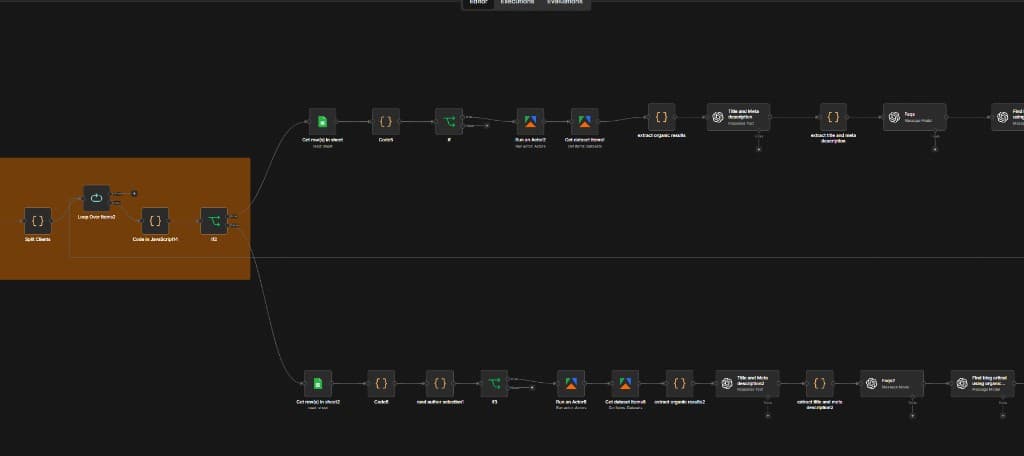
The blog pipeline runs in n8n. It splits clients, loops each row, runs checks, and branches into parallel content paths.
The admin panel does not replace n8n. It triggers and monitors workflows the team already trusts.
Before writing, the workflow pulls live SERP context. Apify actors fetch organic results that feed the AI steps.
Blog posts are not written blind. Each run starts with real search results so titles and content match what ranks today.
OpenAI nodes generate titles, meta descriptions, FAQs, and full blog drafts. Output lands back in sheets or CMS-ready format.
One button from the admin panel can kick off research, writing, and formatting for a full client blog batch.
One automation suite
Managed from one panel
Team operations hub
Blog pipeline engine
We run client SEO the same way we run our own ops. One panel, clear tools, n8n under the hood. The team knows exactly where to go when a blog batch needs to go out.
SynkrAI Operations Team
Internal build